



Skip to content

Agent Access Management

Govern Access of All Your AI Agents to Other Company Systems

Cakewalk enforces least privilege for your AI agents. Every tool call runs through Cakewalk's MCP Gateway, is checked against your custom policies in real time and tracked in one single audit trail. Agents never hold your credentials.

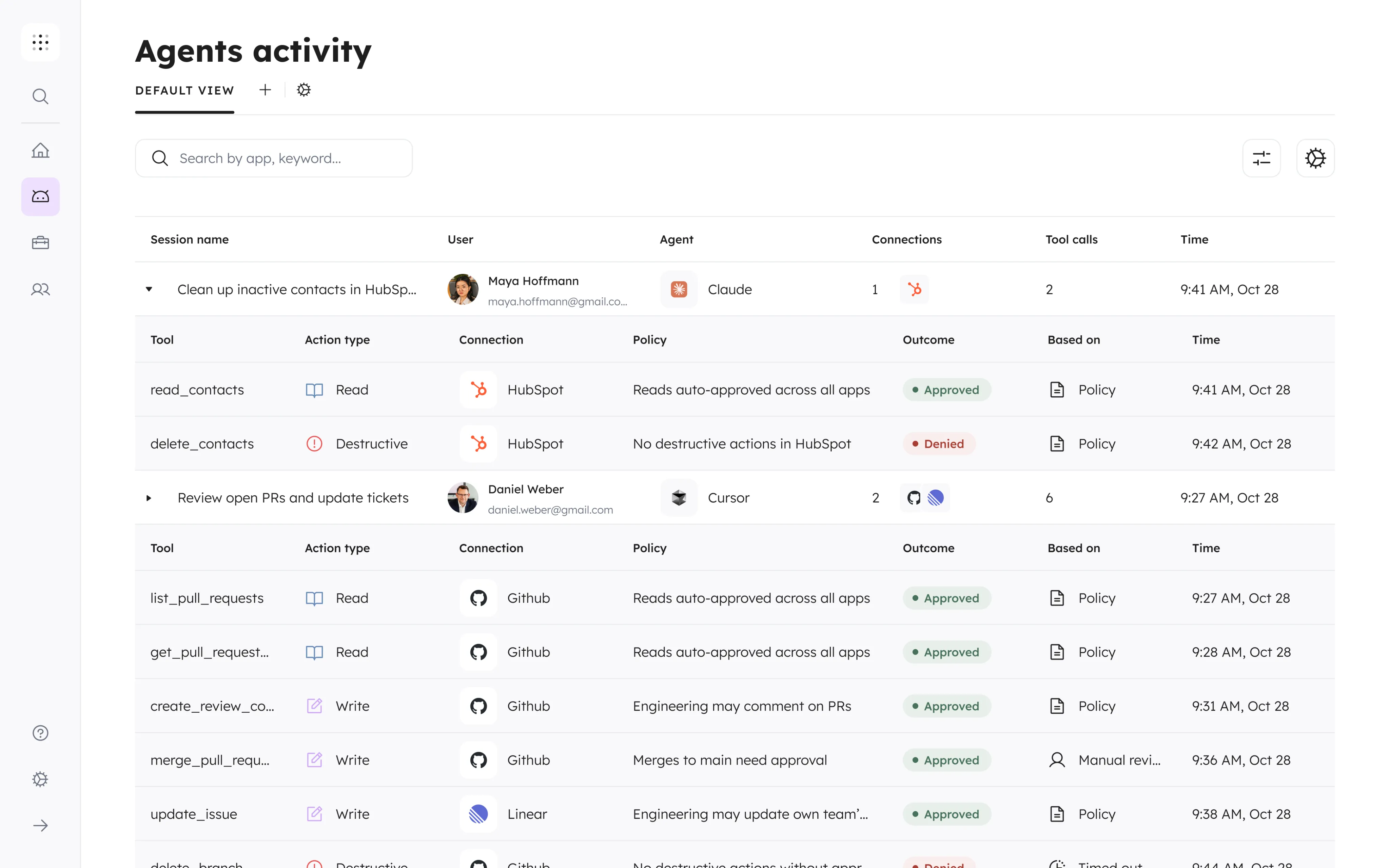
Agents activity: Claude's read_contacts approved, delete_contacts denied; callouts: tool calls, credentials, audit trail.

Skip the pitch. Give an agent a task and watch what happens.

Interactive demo

Trusted by Fast-Moving Security and IT Teams

What you control

The Governance Layer for AI Agents

Book a Demo

Least Privilege

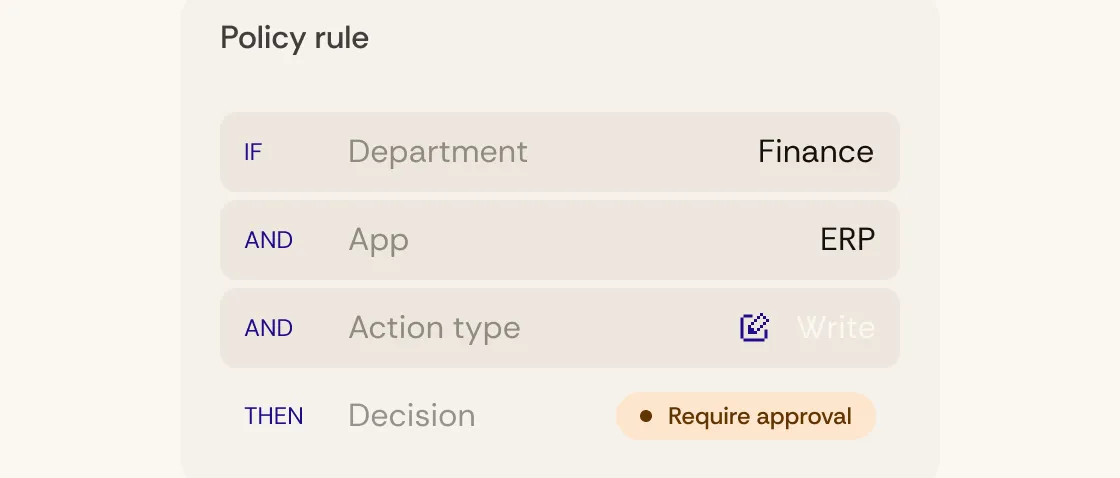
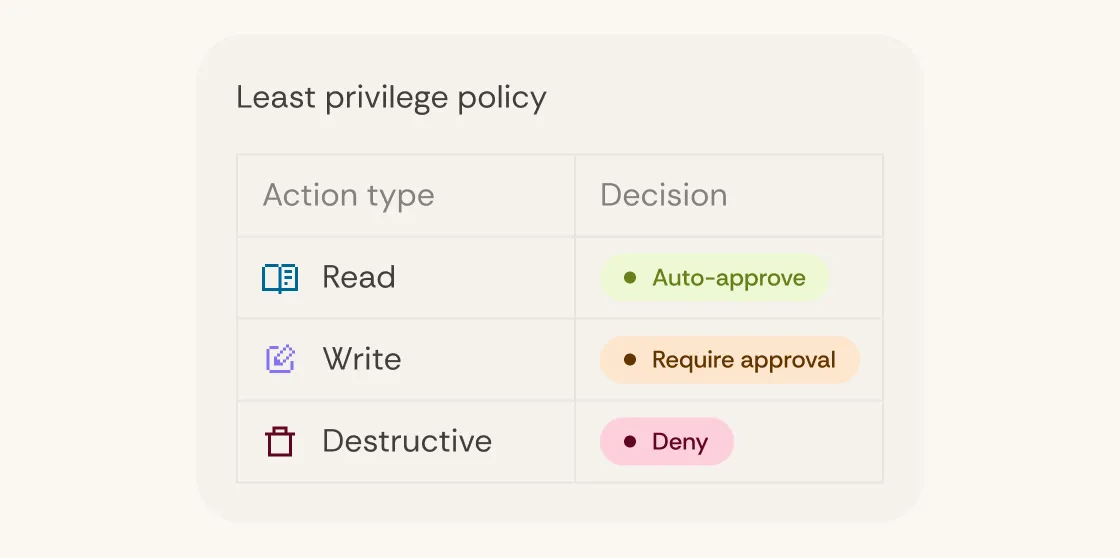
Govern which access actions agents can perform in every connected company system. Cakewalk checks each tool call against your policies and decides: Auto-approve, Require approval or Deny.

Attribute-Based Access

Build policies based on context from your HRIS or IdP, the specific access action an agent is aiming to execute and the respective app the agent calls. Agents from the finance team can, for example, read your ERP but need approval to write. When an employee switches teams, their agents are governed by the new team's policies within hours.

Just-in-Time Access

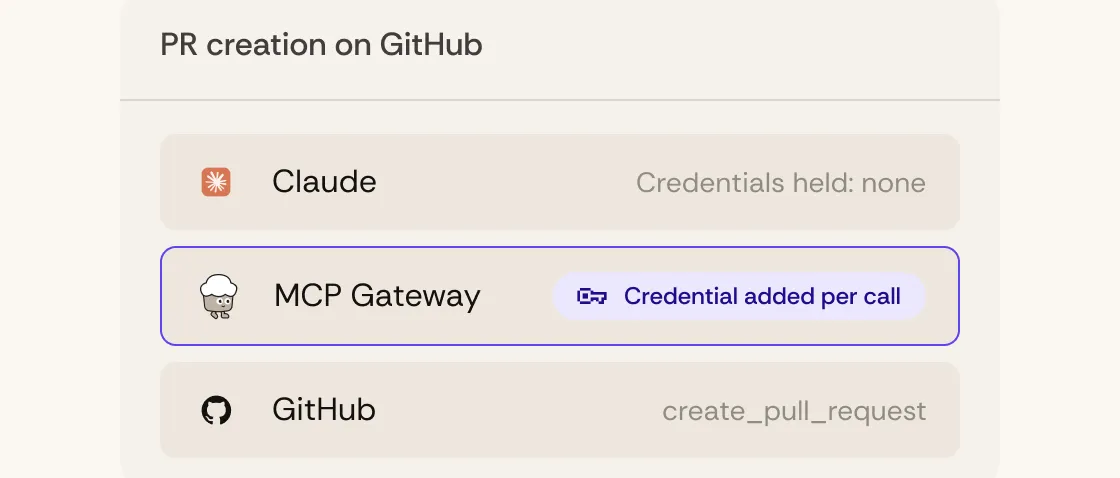
Give agents just-in-time access. Agents hold no credentials and no permissions of their own: every tool call is authorized in real time via your policy machine. Credentials stay encrypted in Cakewalk and are injected per call, so an agent hit by a prompt injection has no token to leak.

Human in the Loop

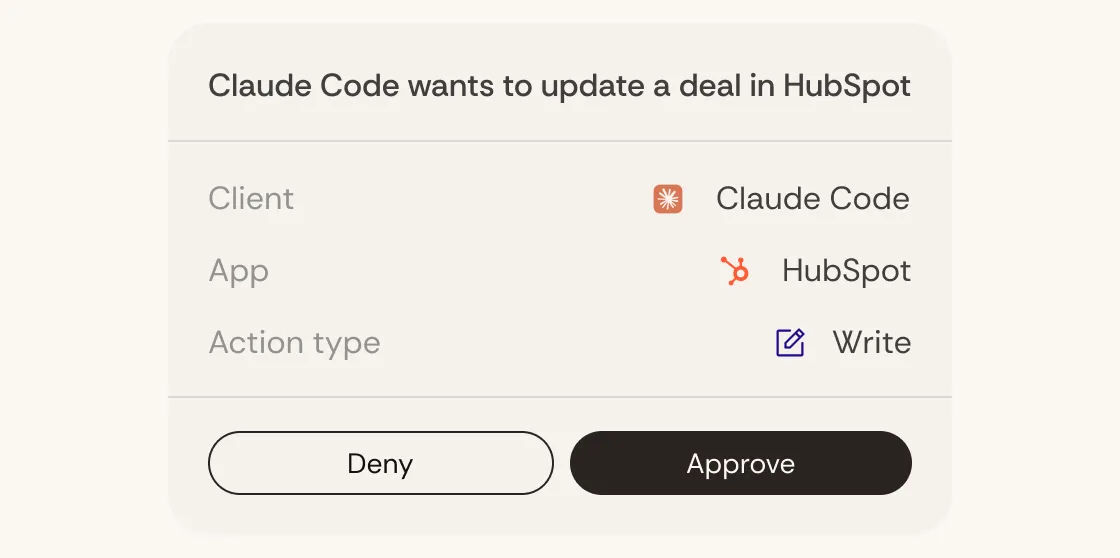
Require extra approval before sensitive actions. The agent of a junior employee wants to write into your CRM or codebase? Cakewalk can pause the action if configured in the respective policy.

Team-Based Connections

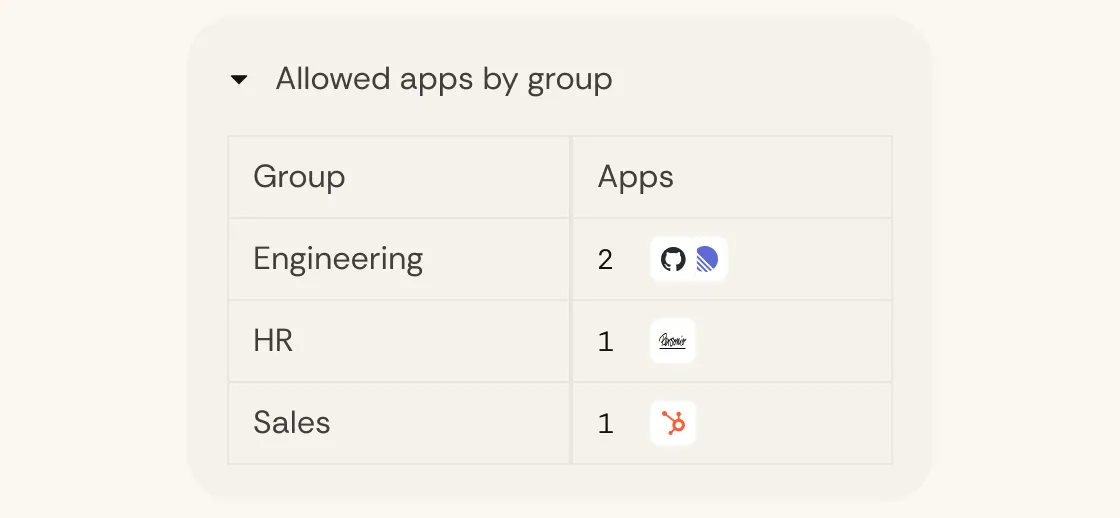
Allow connections per group, synced from your HRIS or IdP. Engineering agents get access to the codebase, HR agents can access your HRIS. When an employee moves teams, their connections follow the group-based agent access of the new team.

Instant Session Termination

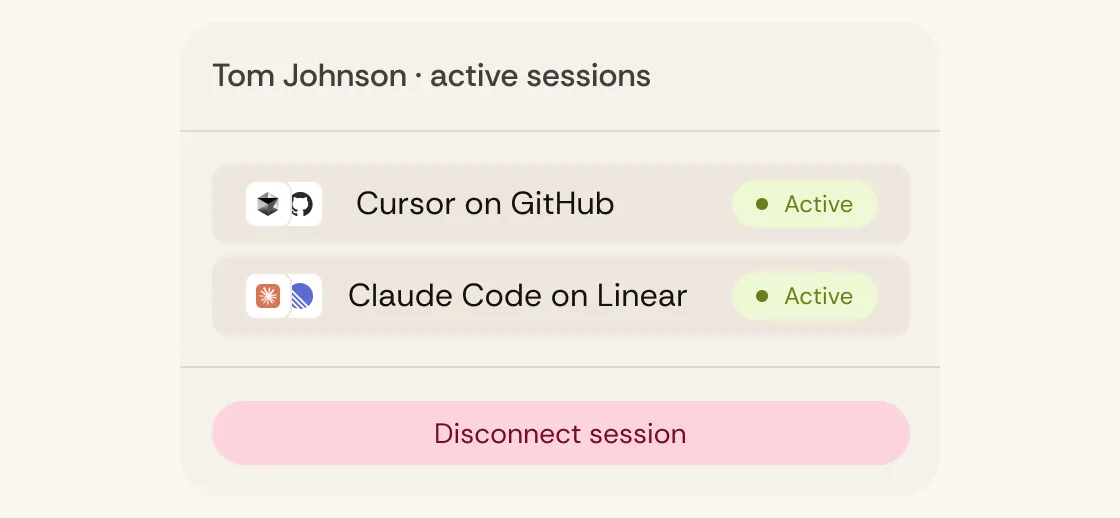
Stop misbehaving agents instantly. An agent is doing something it shouldn't? End the employee's active sessions in Cakewalk, and all agent activity stops immediately. To keep an app blocked, remove it from the group's allowed connections.

Audit Trail

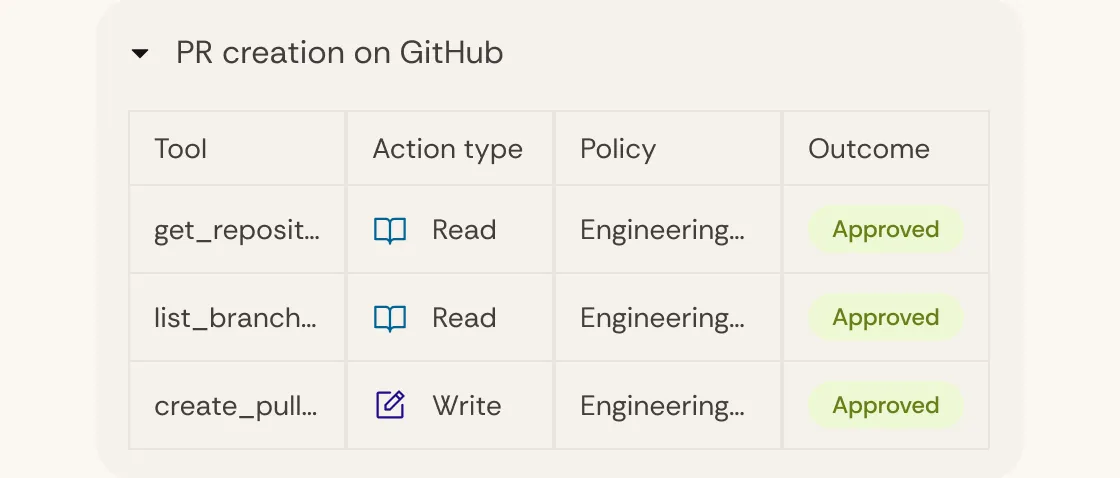
See all AI agents your employees connect through Cakewalk, the company systems these agents access and the human behind each agent. Every single agent action lands in one complete log: the employee, the agent, the app, the policy that fired and the outcome. Ready for your next ISO 27001 or SOC 2 audit.

How it works

Watch Cakewalk Decide on Every Tool Call

Employees already run AI agents in their daily work. Each time an agent calls a company app, Cakewalk checks the employee behind it, the app it accesses and the action it wants to take. Then it approves, pauses or denies the call and records the decision.
Walkthrough steps
1/7
Connect Your SystemsAdmins connect the company's HRIS or IdP, so Cakewalk knows every employee's department, title, team and location.
Personio and Okta connect to Cakewalk, which builds a directory of 248 employees with their department, team and title.
2/7
Define Your PoliciesPolicies set what agents may do: auto-approve, require approval or deny. Each decision is based on customizable variables: the action (read, write or delete), the employee's department, title, team and location, and the app's risk level.
Personio and Okta connect to Cakewalk, which builds a directory of 248 employees with their department, team and title.
3/7
Connect Agents and Authorize AppsEmployees connect the agents they use, from Cursor and Claude to ChatGPT or Copilot, and authorize each app once. Cakewalk stores the credential encrypted in its vault, never in the agent.
Four agents connect to the Cakewalk gateway, which holds GitHub, HubSpot and Slack credentials encrypted, none in the agent.
4/7
An Agent Calls an AppAn employee gives an agent a task. If the task requires access to a third-party app, the agent's call goes through Cakewalk, with the employee, the agent and the app attached.
Maria Hoffmann asks Claude to clean up duplicate HubSpot contacts; its merge_contacts write call goes through the gateway.
5/7
Cakewalk Applies Your PoliciesA custom policy overrides the default. If several match, the strictest outcome wins. If approval is required, the employee confirms or rejects the call in Claude Code, Cursor, VS Code or Codex. In other clients, a company setting decides.
Three policies match merge_contacts; the strictest requires approval, and the employee approves in the agent client.
6/7
Cakewalk Adds the CredentialFor allowed calls, Cakewalk adds the credential the employee authorized in step 3 on the way to the app. The agent receives the result and never sees the credential.
The approved call goes to HubSpot with Maria Hoffmann's credential added; Claude gets only the result, 24 contacts merged.
7/7
Cakewalk Records Every CallEach call is recorded in the audit log with the request, the response, the decision and every policy that fired. Nobody can change a record afterwards.
A read-only audit log of tool calls with employee, agent, app, policy and decision, the merge_contacts record expanded.

Integrations

Govern Every Agent Your Team Already Uses

Cakewalk works with the agent clients employees already use, from Claude Code and Cursor to ChatGPT and Microsoft 365 Copilot, and with the apps those agents reach over MCP. Apps missing from the catalog connect as custom MCP servers.

Better together

The Human Is the Boundary for the Agent

An agent never gets more access than the person who delegated the task. Cakewalk knows both, so every agent decision checks that person's department, title, team and location.

Wall of love

See What Teams Like Yours Say About Us

360°Access visibility

80%Less time spent managing access

I've been using this tool for a few weeks now, and it's been a game-changer. The interface is clean and user-friendly, making it easy to get started without a steep learning curve. Performance is smooth, and all the features work exactly as advertised. On top of that the onboarding is very intuitive and the customer service is super helpful. Highly recommend it for anyone looking to streamline their workflow!

Ewa BłyszczekHR & Operations Manager, Dealstack

Cakewalk has a really nice, light-touch UX that allows your team to easily integrate and record their third-party apps as they use them. No need to review and record all of your apps in one go, just add them as you go and manage them easily in the central web app. The data is super powerful once you get people using it too! The team are also really friendly and helpful. Update: also love the new admin reporting section!

Rogan SageVP of Growth, Embeddable

Resources

Read Our Latest Thinking on Access Management

FAQ

Q&A

Can we buy just one module?

Yes. Each module works on its own, so a company can start with either one and add the other later.

Do we need engineering to set it up?

No. Admins set up Cakewalk in a guided flow that takes under 10 minutes: company details, employees from the HRIS or IdP, then the apps and agents to govern. Default policies apply right away. Employees connect each agent once, following the steps Cakewalk shows for that client.

Which agents and apps does it work with?

Agent clients and apps that connect over MCP, from Claude Code, Cursor and Codex to ChatGPT and Microsoft 365 Copilot, and apps such as Slack, GitHub, Jira and HubSpot. Apps missing from the catalog connect as custom MCP servers.

Can an agent go around Cakewalk?

Cakewalk governs every tool call that goes through its MCP Gateway. Admins can roll the gateway out company-wide, for example as a Cakewalk app in a ChatGPT workspace or as a custom connector in a Claude organization. Direct API calls, command-line tools and browser automation run outside the gateway and are not governed yet.

What happens to agents if Cakewalk is slow or down?

Policy checks add milliseconds to each call. Cakewalk does not fail open: if the gateway can't be reached, agent calls don't reach the app through Cakewalk, so nothing runs unchecked.

What does Cakewalk store from agent calls?

Each tool call is recorded with its request and response, so admins can inspect and export it for audits. Data is hosted on AWS in Europe by default, in a separate database per customer, encrypted at rest and in transit.

How is this different from our identity provider?

An identity provider tells a company who its agents are. Cakewalk decides what each agent may do, on every tool call, before it runs.

How does Cakewalk help with compliance audits?

Every tool call through the gateway leaves a record: the employee, the agent, the app, the policies that fired, the outcome and any approval. Nobody can change a record afterwards, so security teams have the evidence for their own ISO 27001, ISO 42001 or SOC 2 audits.

What happens to an employee's agents when they leave?

Offboarding removes their agent access and deletes the credentials behind their connections. Their agents can't reconnect or start a new session.

Need to Talk Through Something Specific?

Contact Us

Get started

Talk to Us First, Then Test Cakewalk on Your Stack

Book a Demo
  1. We explore

    We start with a call about your setup

    In a first call, we look at the AI agents and apps that already run in your company and where their access sits. We help you sort out the agent chaos and the scattered access, and together we find out whether Cakewalk fits.

  2. You try

    You try Cakewalk for free on your own stack

    We connect Cakewalk to your company's real systems and hand it over. You'll quickly know if your team will use it.

  3. We roll out

    If Cakewalk helps, we roll it out together

    The same team you met in the first call stays with you while we onboard the rest of your company. After that, we meet your team for regular check-ins and support you whenever you need us.

Book Your Cakewalk Demo

Take Control of Your AI Agents & Human Identities.

I understand that by submitting the form, Cakewalk will use the information collected above to schedule a meeting in accordance with our Privacy Policy.

You'll see how to

30 min
  • Find every AI agent and human identity already running across your stack

  • Grant or revoke access in seconds, for both agents and employees

  • Pass your next audit with evidence for every access decision, AI or human

Limited Spots Left

Govern Access for Every AI Agent.

Cakewalk controls what every AI agent can access across your stack, scoped to each task and revoked the moment it's done.

By submitting this form, you agree to receive other communications from Cakewalk per our Privacy Policy. Learn how we store, process and use your data.

  • 300+

    Integrations and agent platforms

  • Zero Standing Permissions

    Every agent starts each task with no access

  • Just-in-Time Access

    Agents get only what the task needs, then lose it

  • Full Audit Trail

    Every agent action is logged and replayable