
Skip to content

Human in the Loop

Keep a Human in the Loop for Sensitive Agent Actions

Cakewalk pauses sensitive agent tool calls and asks the person behind the agent to approve or deny them, right inside Claude Code, Cursor, VS Code or Codex. Everything else keeps running without a prompt.

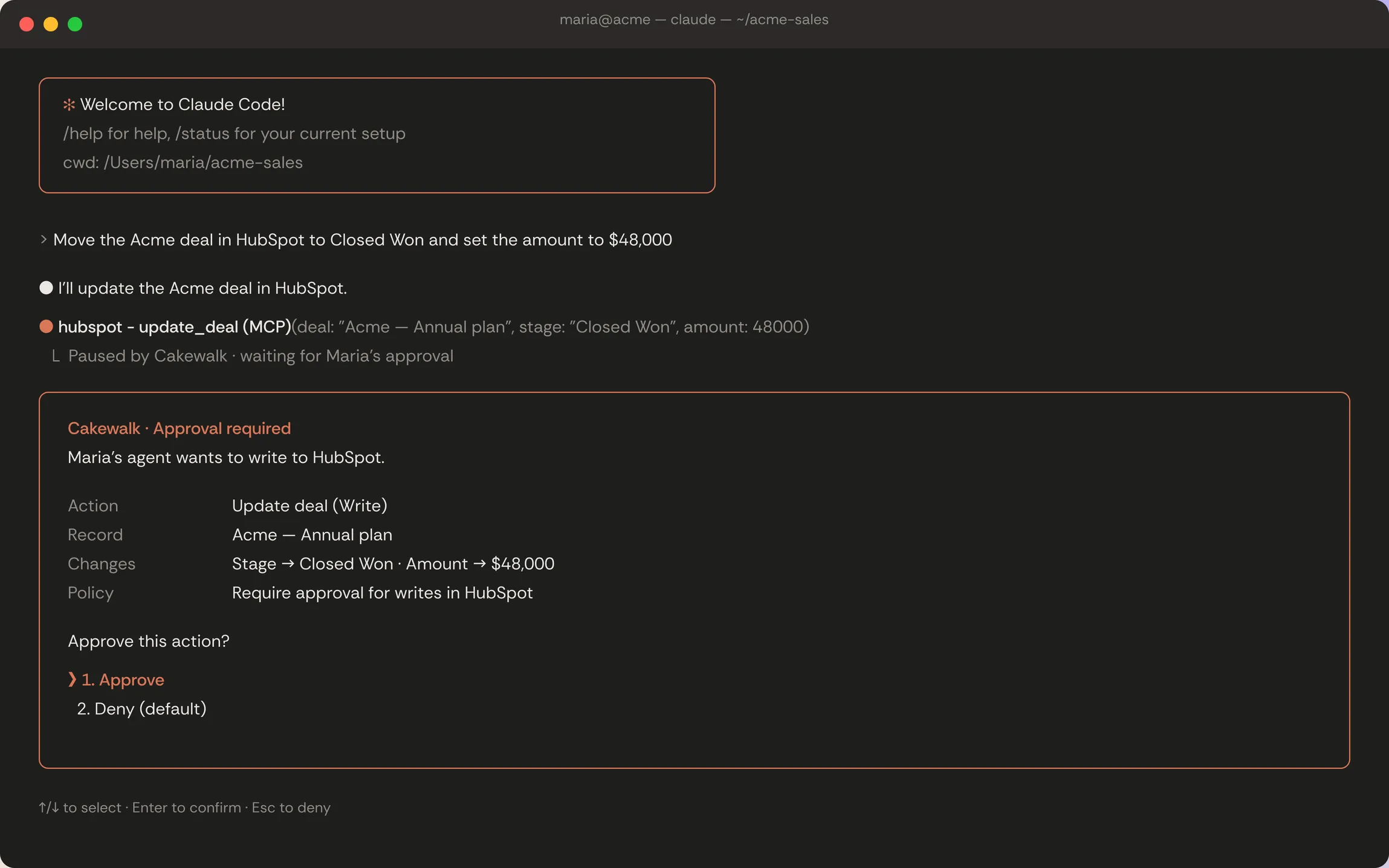
Claude Code paused on Maria's HubSpot deal update: Cakewalk asks her to approve or deny the write, with Deny as the default; callouts: Policy: require approval for writes in HubSpot, and Maria decides inside Claude Code.

Trusted by Fast-Moving Security and IT Teams

The problem

Agents Change Real Data Before Anyone Can Check

How policies work
  • Unchecked Changes

    Once connected, an agent can update deals, send emails and edit records on its own. A misread prompt becomes a real change in your company's apps before anyone sees it.

  • All or Nothing

    Without a middle option, security teams either let agents write freely or block writes entirely. Blocking stops the very work the agents were rolled out for.

  • Approval Fatigue

    When every step asks for a yes, people stop reading and click approve. The one risky change slips through with the rest.
What you get

Put an Approval Between Agents and Risky Tool Calls

Approval support by agent platform
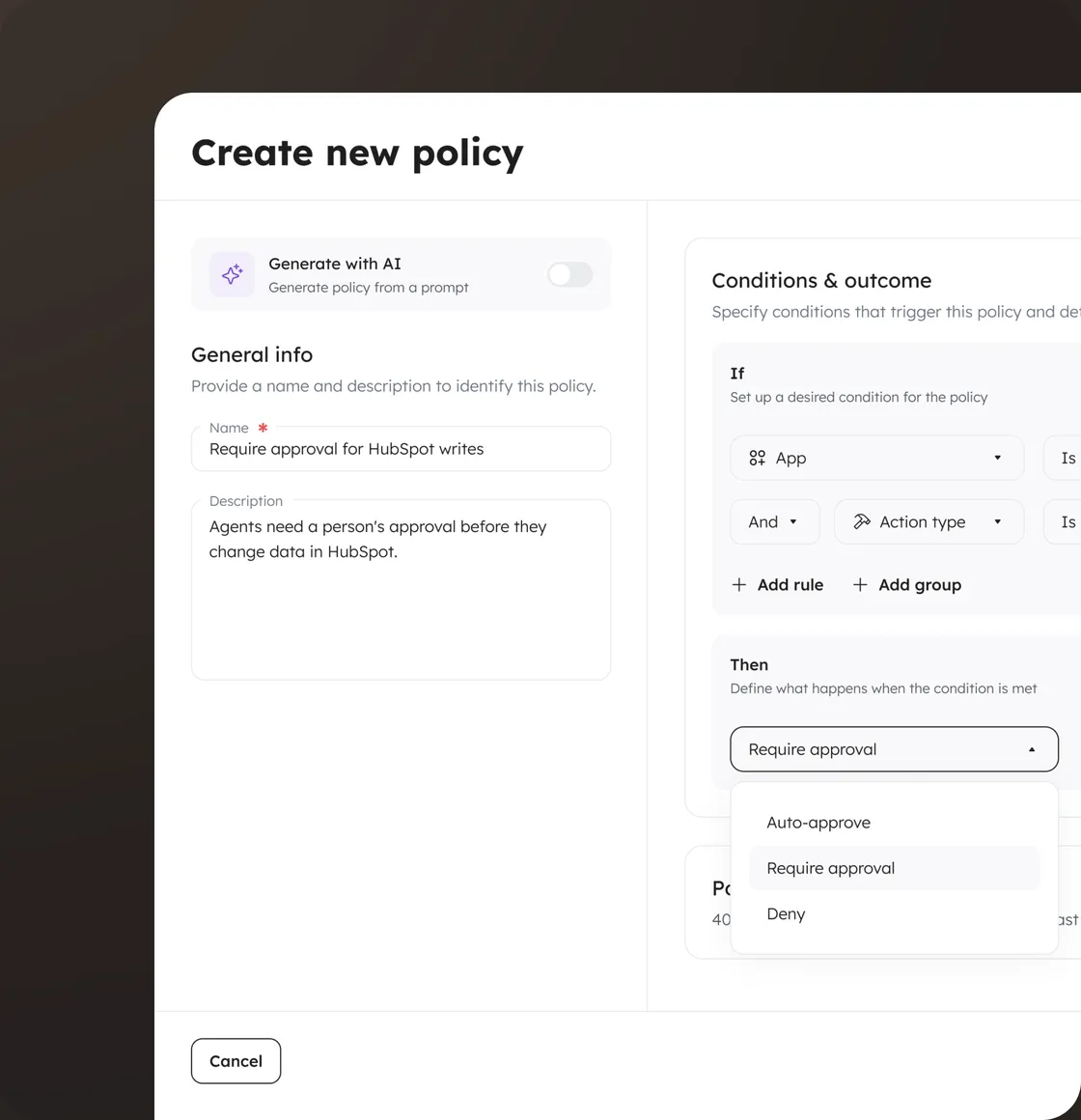
Create new policy in Cakewalk: conditions on the app and the action type, and the outcome menu open with Auto-approve, Require approval and Deny, Require approval selected
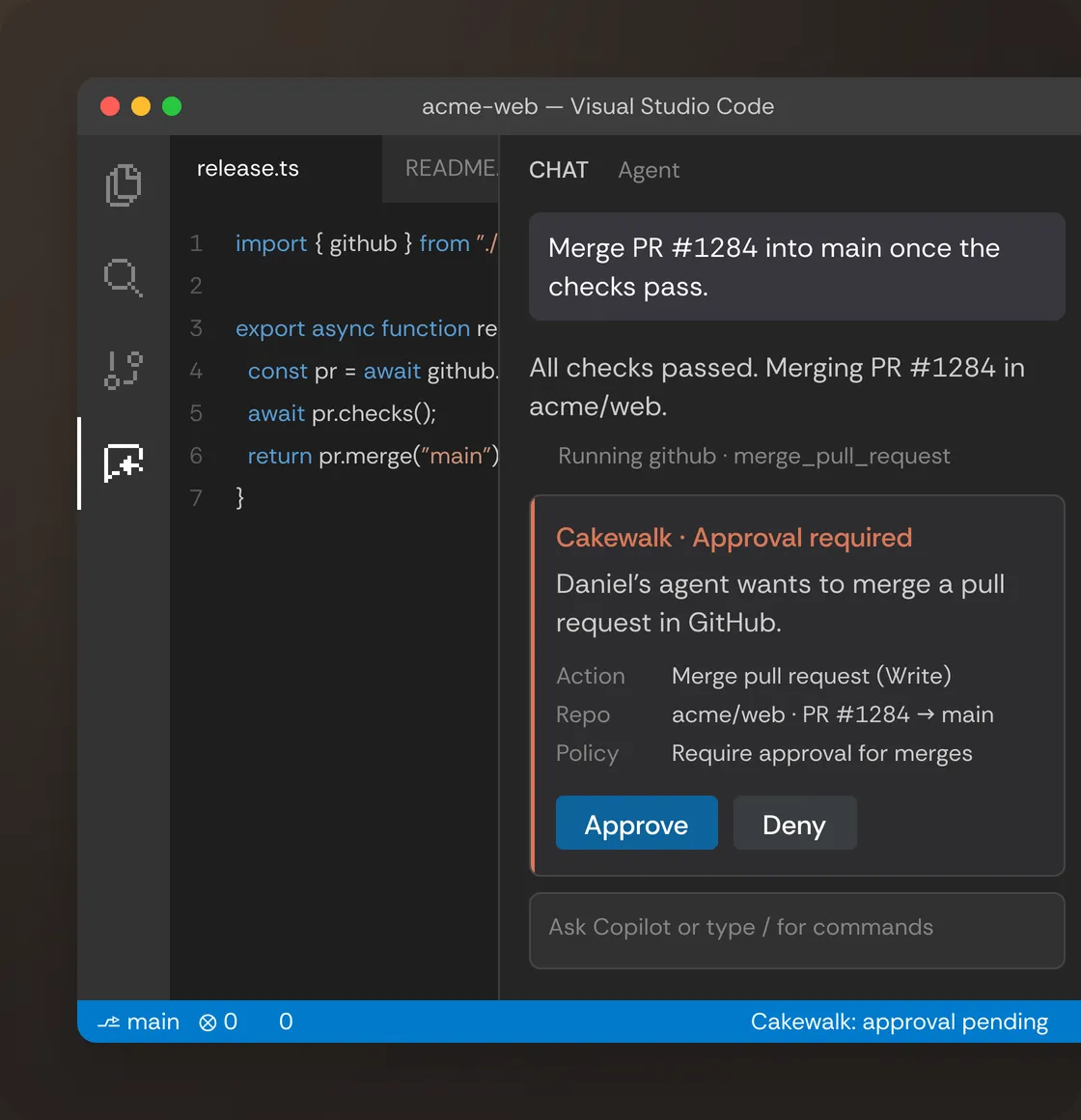
VS Code with Cakewalk's approval prompt in the chat: Daniel's agent wants to merge pull request 1284 in acme/web, with Approve and Deny buttons
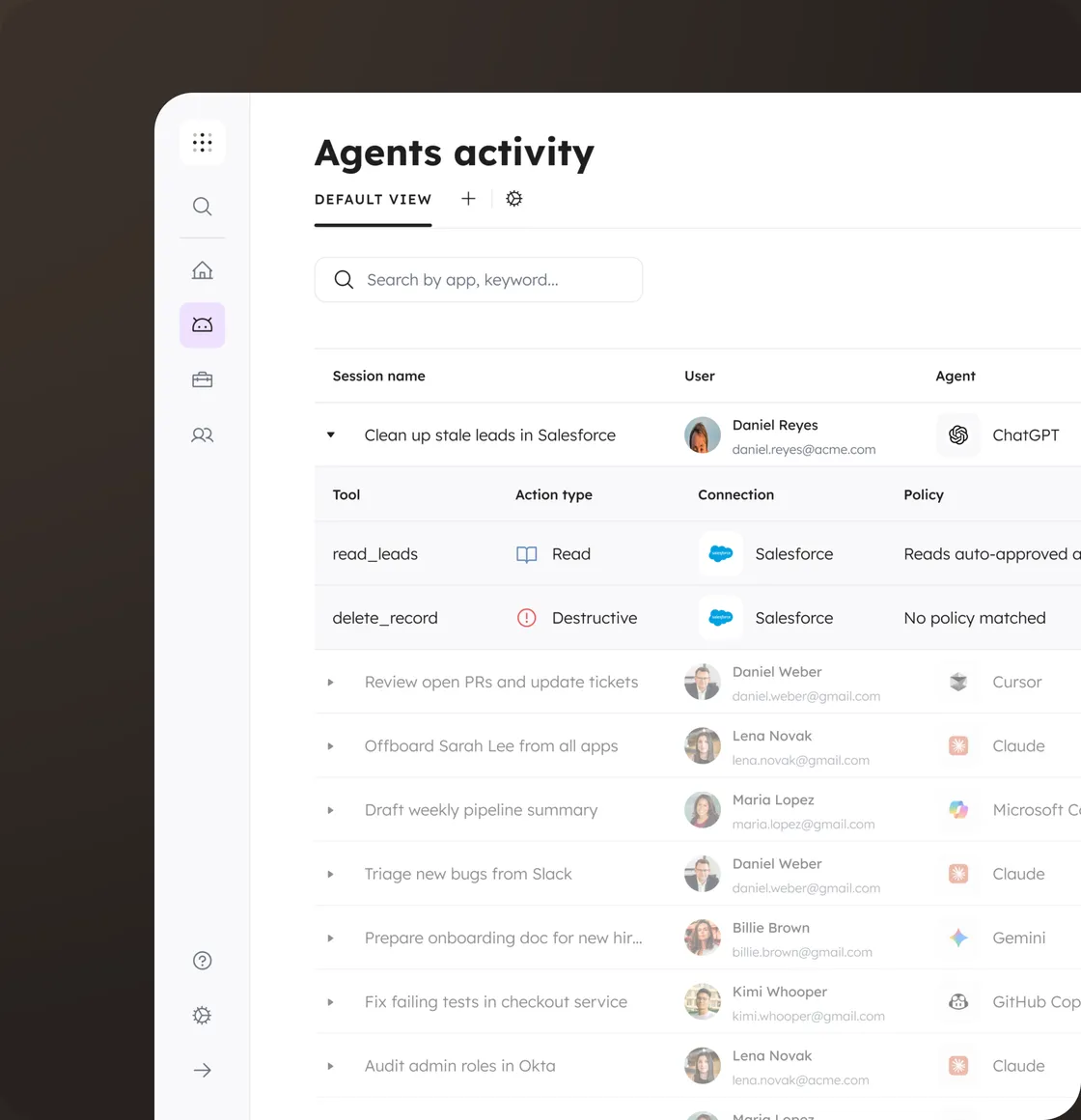
Agents activity in Cakewalk: each session with its tool calls, action type, connection and the policy that applied
  1. Choose exactly which agent actions need approval. Cakewalk gives every policy one of three outcomes: auto-approve, require approval or deny. You can combine them with the action type, app metadata and the employee's department, title, team and location. For example, Maria's agent reads HubSpot freely, but every deal update asks her first. When you change a policy, the next action follows it.

  2. Keep the decision with the person who knows the task. Cakewalk pauses the action and asks the human behind the agent to approve or deny it, right inside Claude Code, Cursor, VS Code or Codex. Daniel sees what his agent wants to change in GitHub and answers without leaving his editor. Each approval covers one action only, and when nobody answers in time, the action is denied.

  3. Stay protected in clients that cannot ask. Where an agent client cannot show a prompt, Cakewalk applies one company setting, which denies the action by default. Lena sees each of these denials in Agent Activity, marked as based on the fallback policy. When the client adds support, approvals start working with no change in Cakewalk.

How it works

Sensitive Tool Calls Wait for Approval

Cakewalk checks every agent tool call against your company's policies before it runs. When a policy requires approval, the tool call waits until the person behind the agent decides.

Walkthrough steps
1/4
Maria Gives Her Agent a TaskIn Claude Code, Maria asks her agent to move a deal to the next stage in HubSpot.
Maria Lopez, Account Executive in Sales, asks her agent in Claude Code to move the Acme deal in HubSpot to the next stage; the deal Acme, Annual plan, sits in the Proposal stage.
2/4
Cakewalk Checks the PolicyUpdating a deal is a write action, and the policy for Sales requires approval for it.
The update_deal tool call of Maria's agent in HubSpot, a write, meets the policy Require approval for HubSpot writes: department Sales, app HubSpot, action type Write, then require approval.
3/4
Maria Approves or DeniesShe sees what the agent wants to change in HubSpot and decides.
Claude Code paused on the HubSpot update_deal call: Cakewalk asks Maria Lopez to approve or deny moving the deal from Proposal to Closed Won, with Deny as the default.
4/4
The Decision Is RecordedAgent Activity records the employee, agent, app, policy and outcome.
An Agent Activity row: Maria Lopez, Claude Code, HubSpot, update_deal, the policy Require approval for HubSpot writes, outcome Approved at 9:42 AM. A note says that if Maria denies it or does not answer, nothing changes in HubSpot.

Guarantees

Approvals Your Security Team Can Rely On

Approval support by agent platform
  • Every Approval on Record

    Every decision lands in Agent Activity with the employee, the agent, the app, the policy that fired and the outcome. That includes approvals, denials and every action the fallback stopped. Lena can see who said yes to what without asking anyone.

    Every decision

    in Agent Activity

  • Denied Unless Someone Says Yes

    Cakewalk checks every agent tool call before it runs, and agents never hold your company's credentials. If nobody answers or the client cannot ask, the action is denied by default. Each approval covers one action, so a single yes never opens the door for the rest of the session.

    0 credentials

    held by agents

  • Supported Agent Clients

    Approval prompts work today in Claude Code, Cursor, VS Code and Codex. Claude on the web and on desktop, Microsoft 365 Copilot and ChatGPT cannot show a prompt yet, so the fallback setting decides there. Approvals work for every app your agents access through the Cakewalk MCP Gateway.

    • Claude Code
    • Cursor
    • VS Code
    • Codex

    4 agent clients

    Claude Code, Cursor, VS Code and Codex

Related features

FAQ

Q&A

Who approves an agent's tool call?

The person behind the agent. Cakewalk asks the employee who gave the agent the task, because they know what it is supposed to do.

Which agent clients show the approval prompt?

Claude Code, Cursor, VS Code and Codex show the prompt right where the person works. In other clients, your company's fallback setting decides, and it denies the tool call by default. Each of these decisions appears in Agent Activity, marked as based on the fallback policy. Approval support by agent platform

Which tool calls need approval?

You decide with policies. Each policy combines the action type, app metadata and the employee's department, title, team and location. For example, Maria's agent reads HubSpot freely, but every deal update asks her first.

How is an approval tied to one tool call?

Each approval covers exactly one tool call. The next call that needs approval asks again, so a single yes never turns into standing access.

What happens if nobody answers?

Cakewalk denies the tool call. Nothing that needs approval runs without a clear yes. If the task still needs it, the agent can try again and the person gets asked again.

How do admins see every decision?

In Agent Activity. Every approval and denial lands there with the employee, the agent, the app, the policy that fired and the outcome, including every tool call the fallback stopped.

Need to Talk Through Something Specific?

Contact Us

Get started

Talk to Us First, Then Test Cakewalk on Your Stack

Book a Demo
  1. We explore

    We start with a call about your setup

    In a first call, we look at the AI agents and apps that already run in your company and where their access sits. We help you sort out the agent chaos and the scattered access, and together we find out whether Cakewalk fits.

  2. You try

    You try Cakewalk for free on your own stack

    We connect Cakewalk to your company's real systems and hand it over. You'll quickly know if your team will use it.

  3. We roll out

    If Cakewalk helps, we roll it out together

    The same team you met in the first call stays with you while we onboard the rest of your company. After that, we meet your team for regular check-ins and support you whenever you need us.

Book Your Cakewalk Demo

Take Control of Your AI Agents & Human Identities.

I understand that by submitting the form, Cakewalk will use the information collected above to schedule a meeting in accordance with our Privacy Policy.

You'll see how to

30 min
  • Find every AI agent and human identity already running across your stack

  • Grant or revoke access in seconds, for both agents and employees

  • Pass your next audit with evidence for every access decision, AI or human

Limited Spots Left

Govern Access for Every AI Agent.

Cakewalk controls what every AI agent can access across your stack, scoped to each task and revoked the moment it's done.

By submitting this form, you agree to receive other communications from Cakewalk per our Privacy Policy. Learn how we store, process and use your data.

  • 300+

    Integrations and agent platforms

  • Zero Standing Permissions

    Every agent starts each task with no access

  • Just-in-Time Access

    Agents get only what the task needs, then lose it

  • Full Audit Trail

    Every agent action is logged and replayable