
Skip to content

Shadow AI and IT Discovery

Discover Shadow AI and IT Across Your Company

Cakewalk discovers the shadow AI and IT your people use on their own and shows you who uses what. Your company's app inventory updates itself as people work, so IT stops tracking apps in spreadsheets.

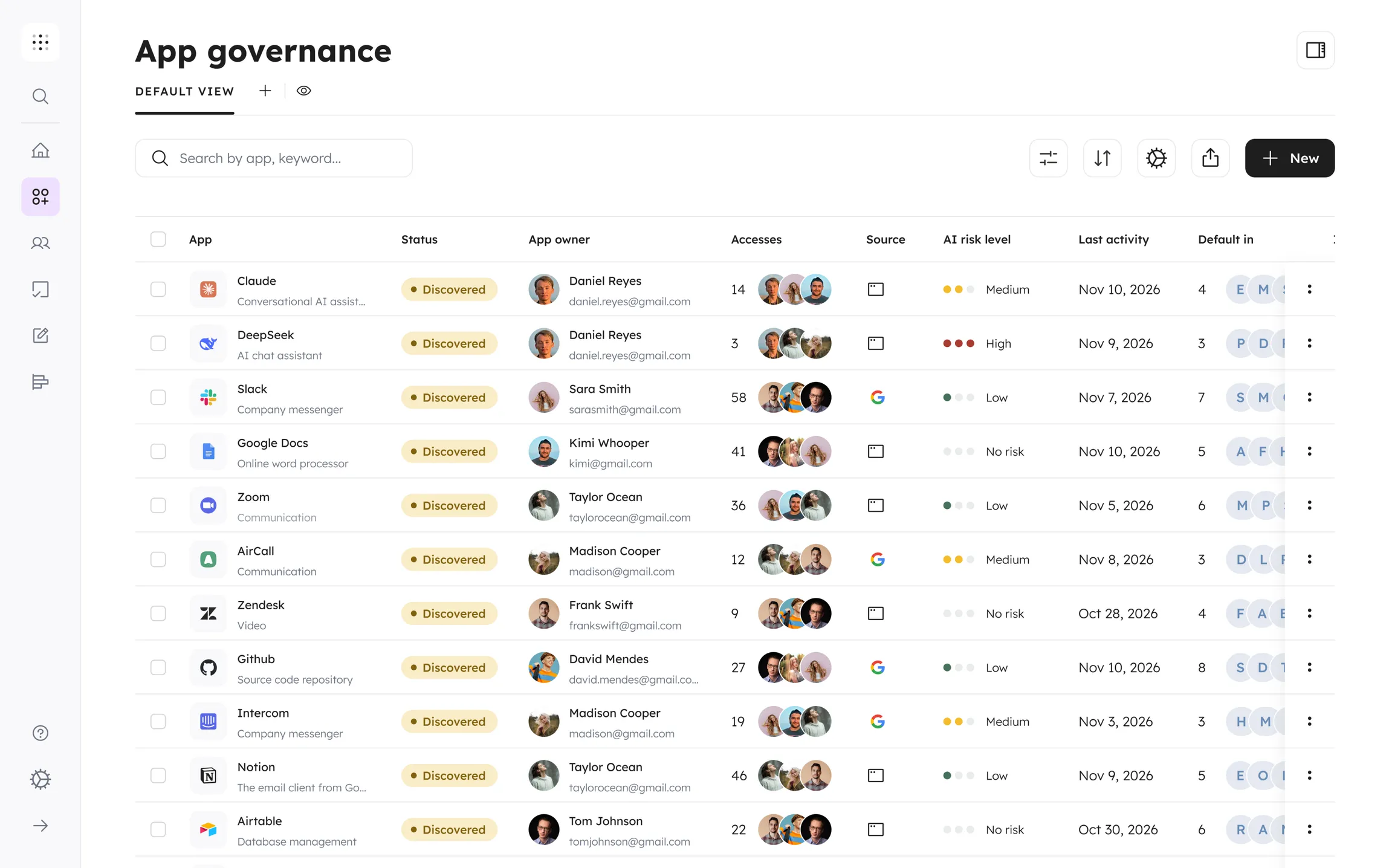
Cakewalk's app governance list of discovered apps led by Claude and DeepSeek, with each app's owner, accesses, source, AI risk level and last activity; callouts: who uses it, when they last did, AI risk level

Trusted by Fast-Moving Security and IT Teams

Why it matters

Keep Up With the AI Your People Already Use

More on shadow AI
  • Company data sits in AI apps nobody approved

    People sign up for AI apps with a work email or a personal one and start sharing company data. IT finds out from an expense report, if at all.

  • SSO only covers the apps IT set up

    SSO runs through your company's identity provider (IdP). Apps people open with a password or a personal account never pass through it, so no access review or audit sees them.

  • AI requests arrive faster than IT can answer

    People ask for new AI apps every week, by ticket, email and Slack. IT answers each request by hand, and the queue grows with every AI launch.
What you get

Approve the AI People Need and Keep the Rest in Sight

More on App Discovery
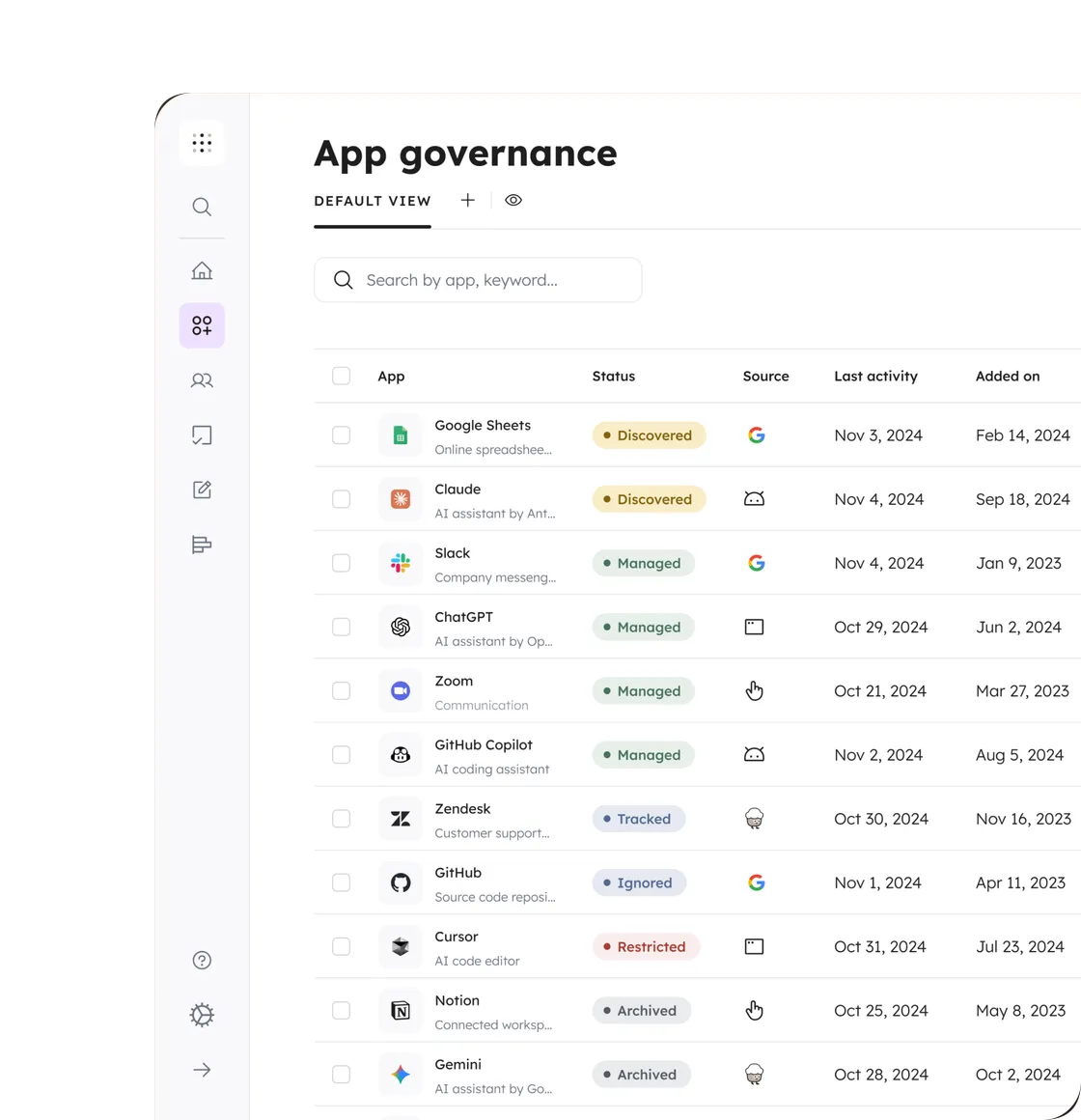
Cakewalk's app governance list with each app's status, source, last activity and the date it was added
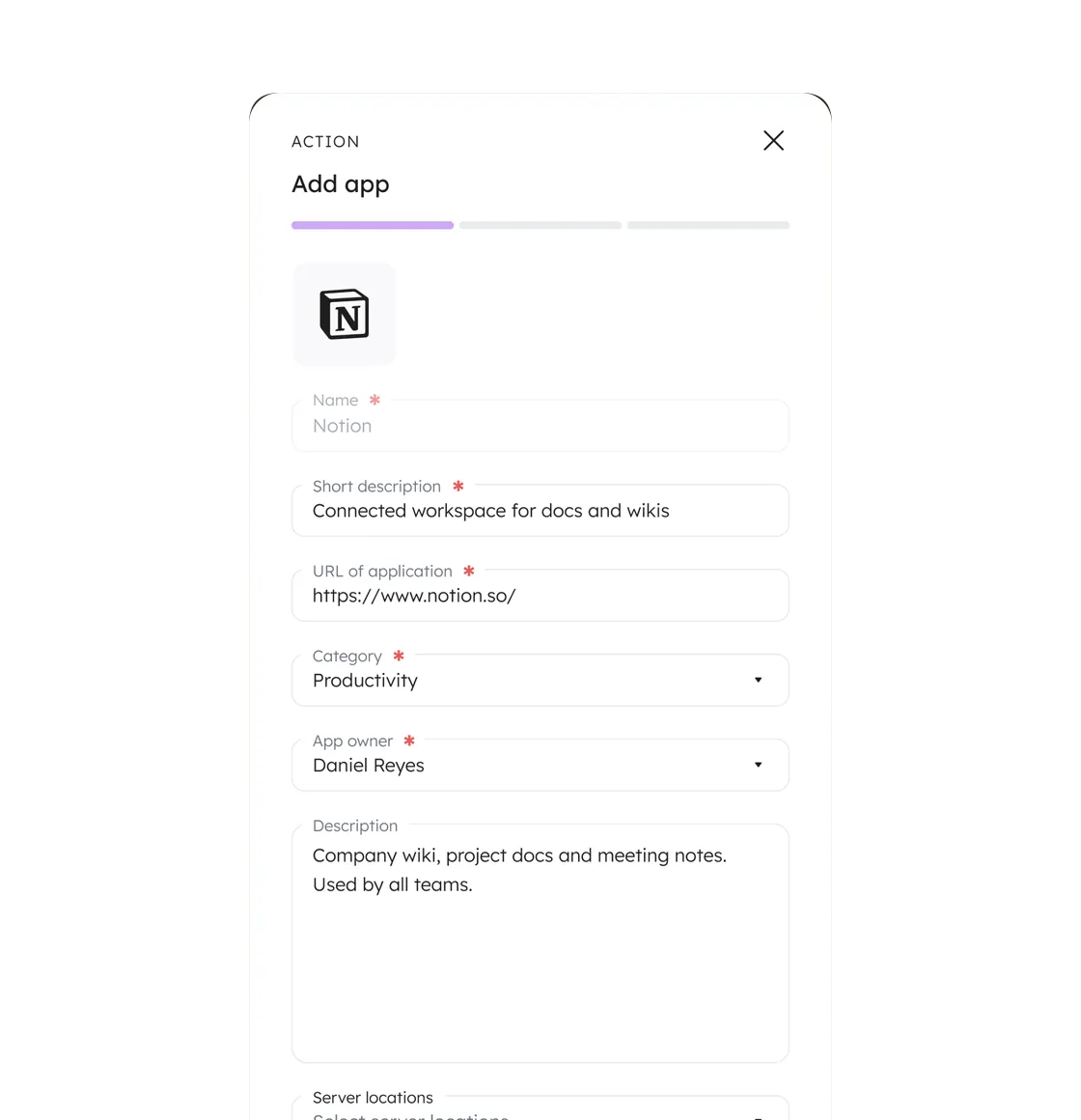
The Add app panel in Cakewalk for Notion, with its description, category and app owner
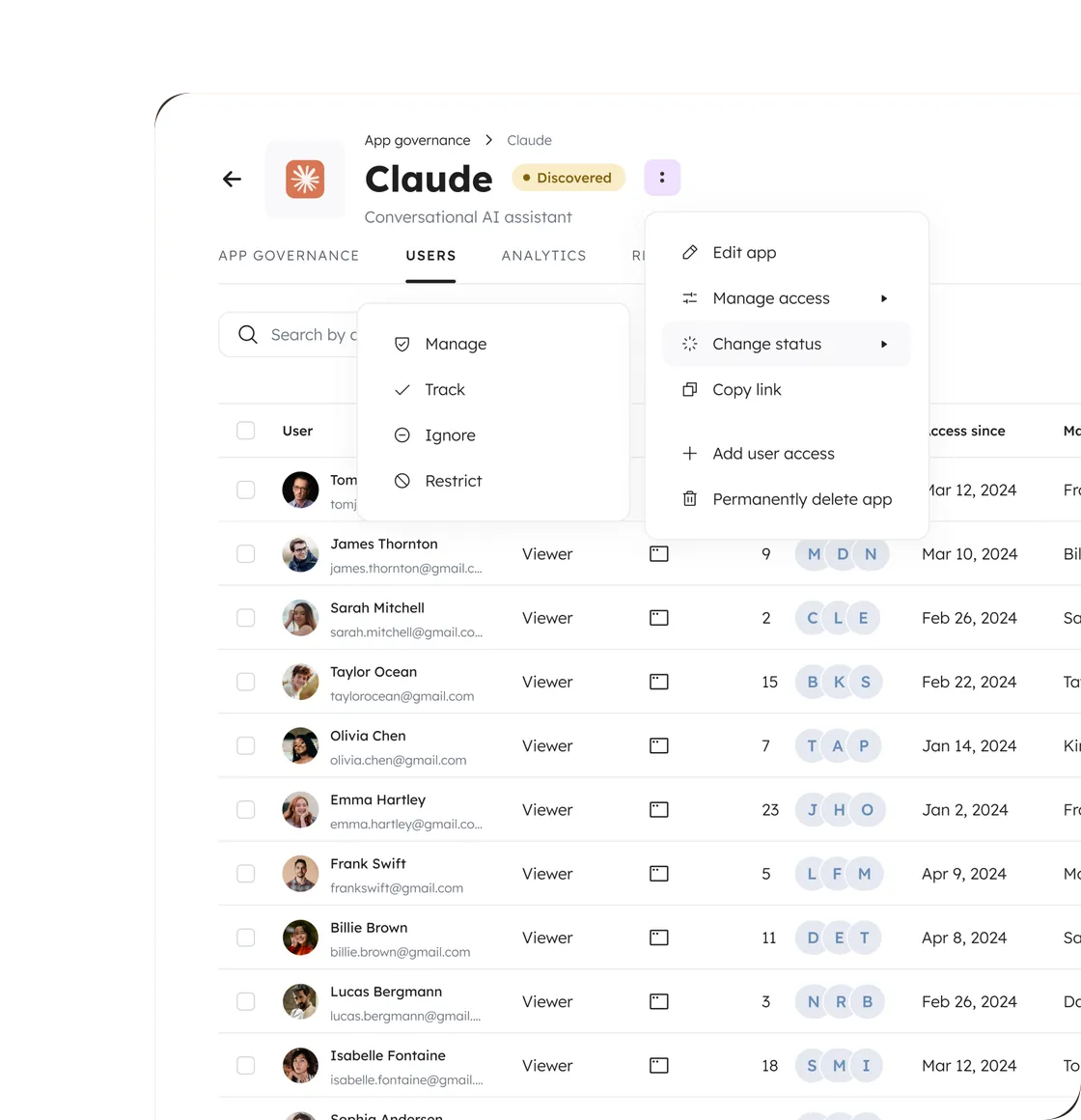
The Change status menu on Claude, a discovered app in Cakewalk, with Manage, Track, Ignore and Restrict
  1. See the apps and AI your people use, whether they sign in with SSO, a password or a personal account. Cakewalk lists each app with who uses it and when they last did.

  2. Approve an app once and people request it from the app catalog or in Slack. The approval rules you set decide who signs off.

  3. Decide on each new app in your company's app inventory: approve it, keep tracking it or restrict it when it puts company data at risk.

How it works

Spot New Apps Automatically and Decide Once

Walkthrough steps
1/9
DiscoverTrigger: Someone opens an app Cakewalk recognizes in a browser with the Cakewalk extension. Admins can also import the apps people sign into with Google or Microsoft.
Claude open in a browser tab next to DeepSeek, with the Cakewalk extension in the toolbar; badge: found as people work
2/9
DiscoverDecision: Cakewalk adds the app to your company's app inventory with the people using it, their last activity and the app's AI risk level. Admins get a summary of new apps in Slack.
Discovered apps in Cakewalk with their users, AI risk level and last activity, next to Cakewalk's weekly Slack summary of Claude and DeepSeek
3/9
DiscoverAction: Cakewalk keeps recording who uses the app, and an admin approves or restricts it when ready.
Claude in Cakewalk's app governance list with its Change status menu open: Manage, Track, Ignore and Restrict
4/9
ApproveTrigger: An admin manages the app and names its owner.
The Add app panel in Cakewalk for Claude, with Daniel Reyes as app owner
5/9
ApproveDecision: People request it from the app catalog or in Slack, and the app's access policy decides who approves.
Claude's access policy with manager approval decides who approves Maria Lopez's request for Claude in Slack
6/9
ApproveAction: People Cakewalk saw using the app show up in access reviews and get a removal request when they leave.
Claude's users in Cakewalk with the source that found each one, the browser extension among them
7/9
RestrictTrigger: An admin restricts the app, and nobody can request it anymore.
The Change status menu on DeepSeek in Cakewalk's app governance list, with Restrict selected
8/9
RestrictDecision: Anyone new who opens it sees a warning and can only go on after agreeing that admins are told.
Cakewalk's warning in the browser that DeepSeek is restricted, with a checkbox to agree that admins are notified and a button to continue
9/9
RestrictAction: When someone continues, admins get their name by email or Slack, and Cakewalk records the access.
Cakewalk's Slack message to admins naming the person who continued to DeepSeek

Integrations

Start Discovery Without Changing How People Work

See all integrations
  • Chrome, Edge, Firefox and other Chromium browsers

    • Google Chrome
    • Microsoft Edge
    • Firefox

    Browser extension

    Chrome, Edge, Firefox

  • Apps people sign into with Google or Microsoft

    • Google Workspace
    • Microsoft Entra ID

    Google and Microsoft

    Google Workspace, Microsoft Entra ID

  • Apps Cakewalk recognizes, AI included

    • ChatGPT
    • Claude
    • Lovable

    Cakewalk's catalog

    ChatGPT, Claude, Lovable

  • MDM rollout through Microsoft Intune, Jamf, Kandji and more

    Push the extension through your company's mobile device management (MDM), or let Cakewalk ask each person to install it.

    • Microsoft Intune
    • Kandji
    • Mosyle

    MDM rollout

    Intune, Kandji, Mosyle

Related features

How does Cakewalk discover shadow AI and IT?

Cakewalk's browser extension recognizes the apps in Cakewalk's catalog, including AI apps such as ChatGPT, Claude and Lovable, whenever people open them in Chrome, Edge, Firefox or another Chromium browser. Admins can also import the apps people sign into with their Google Workspace or Microsoft Entra ID account.

What does Cakewalk's browser extension read?

Cakewalk's browser extension reads only the addresses of the pages people open and checks them against Cakewalk's catalog. It never reads page content or passwords. Turn on prompts and people confirm each new app before Cakewalk records it.

Can Cakewalk discover our internal apps?

Yes. Add an internal or niche web app to Cakewalk with its address, and Cakewalk's browser extension records who opens it like any other app.

Does Cakewalk help with an ISO 42001 audit?

Yes. Cakewalk lists the apps people use, who uses each one and the AI risk level from Cakewalk's catalog, so your company's ISO 42001 audit starts from real usage.

How is this different from our identity provider?

Your company's identity provider (IdP) knows the apps IT connected to it. Cakewalk also finds the apps and AI people open with a password or a personal account, so shadow IT outside SSO shows up too. You then decide what happens to each app.

Need to Talk Through Something Specific?

Contact Us

Get started

Talk to Us First, Then Test Cakewalk on Your Stack

Book a Demo
  1. We explore

    We start with a call about your setup

    In a first call, we look at the AI agents and apps that already run in your company and where their access sits. We help you sort out the agent chaos and the scattered access, and together we find out whether Cakewalk fits.

  2. You try

    You try Cakewalk for free on your own stack

    We connect Cakewalk to your company's real systems and hand it over. You'll quickly know if your team will use it.

  3. We roll out

    If Cakewalk helps, we roll it out together

    The same team you met in the first call stays with you while we onboard the rest of your company. After that, we meet your team for regular check-ins and support you whenever you need us.

Book Your Cakewalk Demo

Take Control of Your AI Agents & Human Identities.

I understand that by submitting the form, Cakewalk will use the information collected above to schedule a meeting in accordance with our Privacy Policy.

You'll see how to

30 min
  • Find every AI agent and human identity already running across your stack

  • Grant or revoke access in seconds, for both agents and employees

  • Pass your next audit with evidence for every access decision, AI or human

Limited Spots Left

Govern Access for Every AI Agent.

Cakewalk controls what every AI agent can access across your stack, scoped to each task and revoked the moment it's done.

By submitting this form, you agree to receive other communications from Cakewalk per our Privacy Policy. Learn how we store, process and use your data.

  • 300+

    Integrations and agent platforms

  • Zero Standing Permissions

    Every agent starts each task with no access

  • Just-in-Time Access

    Agents get only what the task needs, then lose it

  • Full Audit Trail

    Every agent action is logged and replayable